Everything your parents told you about cookies is a lie!

In case you haven't looked at your calendar lately, we made it to 2025... 🎆 and that's exciting not only because Joomla will enjoy its 20 year anniversary 🎂 soon, but because the World Wide Web is definitely a bit more interesting than when it first started...
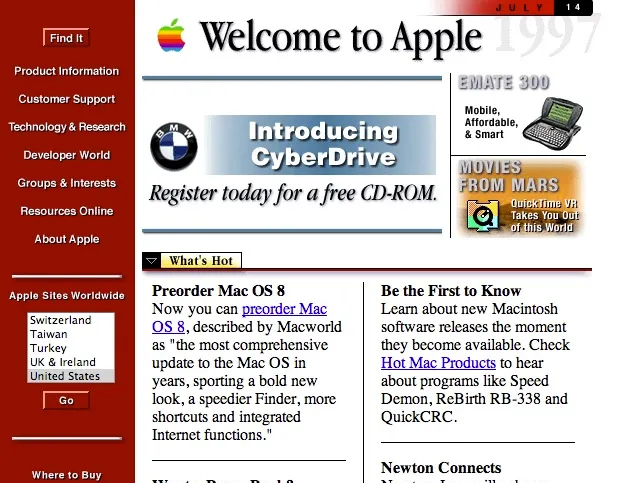
The Welcome page of the Apple website in a 2 column format - 1990s era

Apple's homepage in the mid-90s...


but aside from the look and feel, and navigation styles, a lot of other things have changed. In the last few years, particularly, some of those changes have come in the shape of Privacy and Consumer/User rights updates...

In 2025, if you don't have the proper understanding of what cookies are, you might just get yourself into trouble... not just the European Union where GDPR policies are in effect.

Many other parts of the world are starting to take a serious position when it comes to Consumer Rights and Privacy:

California Consumer Privacy Act (CCPA/CPRA) - USA
Personal Information Protection Law (PIPL) - China
Lei Geral de Proteção de Dados (LGPD) - Brazil
Digital Personal Data Protection Act (DPDPA) - India
Protection of Personal Information Act (POPIA) - South Africa
Personal Data Protection Act (PDPA) - Singapore
Revised Data Protection Act (UK GDPR) - United Kingdom
Swiss Data Protection Act (Revised 2023) - Switzerland
Personal Information Protection and Electronic Documents Act (PIPEDA) - Canada
Act on the Protection of Personal Information (APPI) - Japan
Personal Information Protection Act (PIPA) - South Korea

( and of course, for violations, they basically all carry fines💰).

In some capacity or another, all of the above Regulations/Acts have some more or less strict provisions around Cookies... and these Cookies 🍪 won't give you a sugar high or cause cavities 🦷 — so let's dive into what are all of these different types of Cookies - ( I'll focus on GDPR as that is the most widespread, comprehensive, and stringent privacy framework currently ).

Cookies can be catalogued by different criteria: SourceFunctionality, even Security Attributes among others.

By Source

  • 1st party cookies: created when one visits a website to remember preferences (i.e. cart items, login details, or language settings). These expire when the browser closes and are typically session-based.
  • 3rd party cookies: placed by external partners/domains (i.e. analytics tools, advertisers etc ) to track cross-site behavior for analytics and targeted ads. These raise privacy concerns and persist longer...

By Functionality

  • Strictly necessary Cookies: required for a website's core functionality (i.e. shopping cart, login etc). ✅
  • Performance/Analytics Cookies: tracks user interactions (i.e. page visits, bounce rates) mostly to optimize a site's performance. ⚠️ GDPR requires consent.
  • Functional Cookies: enables non-essential features (i.e. preferences saving). ⚠️ GDPR requires consent.
  • Targeting Cookies: used for ad personalization. ⚠️ GDPR requires explicit consent.

By Security Attributes

  • Secure cookies: to prevent interception, these are only transmitted only over HTTPS.
  • HTTP-only cookies: they protect sensitive data and block access to client-side script
  • SameSite cookies: to mitigate CSRF attacks, they restrict cross-site sharing.


✅ - Consent is not required under GDPR.

⚠️ - GDPR requires consent — in some cases, explicit consent before use.

If you are starting to think that this gets complicated quickly, you would be correct.

Just with GDPR and CCPA/CPRA, there are a lot of subtleties and that's without adding country or regionally based nuances such as the French CNIL (French independent regulatory authority responsible for ensuring data protection and privacy rights) or Germany's Telecommunications and Telemedia Data Protection Act (TTDSG) and German Data Protection Authorities (DPAs) which adds a layer of rules beyond GDPR and the EU's ePrivacy Directive (ePD).

So, what can you do with all these different regulations and this ever evolving privacy landscape?

The easiest approach is to provide a clear and transparent declaration of what cookies your website uses and to require consent for everything other than Strictly necessary Cookies.

And when it comes to Joomla (since v3.9+), you have some built-in help from the core:

Privacy Tool Suite includes:

  • Consent tracking for registered users.
  • Data request workflows with access, export, and deletion.
  • Core API for reporting collected data for extensions.

Current Limitations of the suite: It lacks automatic blocking, granular cookie categorization, or granular banner customization — features required for full GDPR/ePrivacy compliance.Unfortunately, many extensions or services still fail to meet the necessary compliance standards today, leaving gapes in your site's adherence to the latest regulations...Since you need more capabilities than what Joomla 5 provides built-in, you may want to check out one of these quality extensions to complement the built-in features, here are a few to consider (in no particular order):

Free only Free & Paid options Paid only
n3t Cookie Consent Cookies CK Joomla! GDPR component
EU e-Privacy Directive   Web357 Cookies Policy Notification Bar

Honorable Mention: 
JA Joomla GDPR Extension (currently lacks some important/required features but should qualify in the future).NOTE: 
I realize there are also 3rd party online solutions that exist like CookieBot, Osano, Iubenda, Enzuzo, OneTrust and several others. However, these solutions are often not native to Joomla or do not offer a Joomla extension. They are typically not free without limitations or are paid-only options, often requiring a monthly subscription.


In conclusion:

Similar to the idea that all websites should be accessible, and while many of the requirements around Cookies might seem to be inclusive of the European Union and GDPR, I would urge all website creators to include a Cookie Banner / Management into their website. This helps protect users' privacy and provides a more transparent approach to handling their data, which is beneficial for the entire internet and everyone using it.Enjoy munching on 'em cookies...  🍪🥠🍪

Some articles published on the Joomla Community Magazine represent the personal opinion or experience of the Author on the specific topic and might not be aligned to the official position of the Joomla Project
Connecting third-party PHP libraries in Joomla

When developing websites or extensions for Joomla, sometimes tasks arise that have already been solved by someone. In the development world, such solutions are designed as libraries - sets of files and classes that make it possible to simply plug them into your script and use code written and well-tested by other developers. These can be php libraries for image processing, working with PDF, connecting to third-party services via the REST API, and much, much more.

PHP libraries are convenient because they can be accessed from anywhere in the Application: from a plugin, component model, module, etc. This article explains how to properly connect a third-party PHP SDK to your project.

Composer

Joomla does not support working with Composer directly. In order to use the library in your work, you need to "wrap" it in a Joomla extension type library and install it. In serious projects, the approach of fixing versions of all components of the project is adopted: the code has been checked more than once, tested and allowed to work in the production.
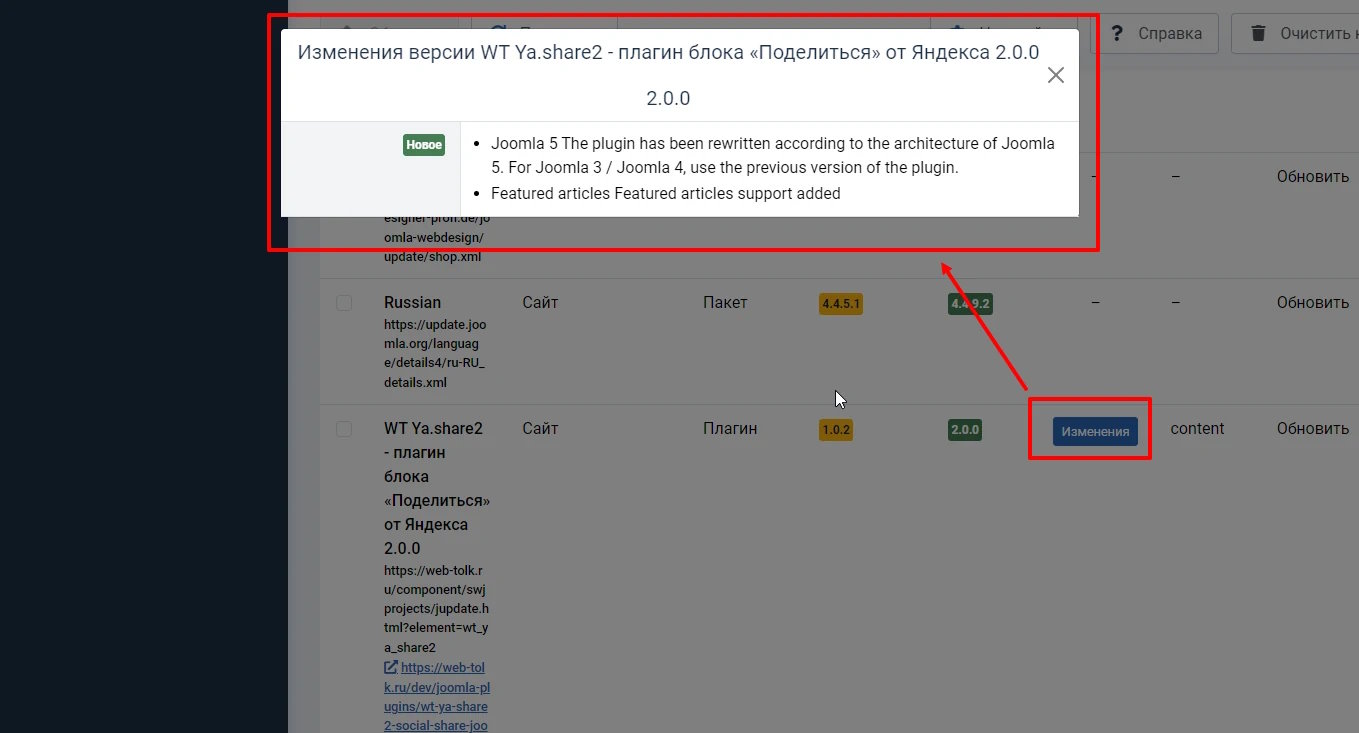
You create a package with your library, install it wherever you need it. As new versions of the library are released, you update your wrapper and get all the advantages of working with Joomla extensions: updating extensions in the standard way, including through the CLI. View the Changelog of the extension in the admin area BEFORE updating, etc.

View the Changelog extension in the admin area BEFORE updating to Joomla 5.

Joomla, PSR, Symfony

Joomla complies with PSR standards, so it is convenient to work with it in this regard. Some Symfony packages are included in the Joomla core (console, string, vardumper, yaml, error-handler and others), so if you suddenly want to add more, they will fit in and work well. You can see what else is worth in Joomla besides Symfony components in libraries/vendor.

How to wrap a 3rd-party PHP library in a Joomla extension?

Nothing complicated. The library files are usually located in the src folder. Next to this folder, you need to create an XML manifest of the Joomla extension according to the documentation (manual.joomla.org). Then we pack everything into a zip archive and that's it! It can be installed.

If you need your own tables in the database for the library to work, you need to add the necessary files with SQL queries during installation or update. Since Joomla 4+ works with namespaces, it is important to specify this namespace in the XML manifest for the extension. Here is an abbreviated example of an XML manifest for the Joomla library.

<?xml version="1.0" encoding="UTF-8" ?>
<extension type="library" method="upgrade">
     <name>WebTolk AmoCRM library</name>
     <libraryname>Webtolk/Amocrm</libraryname>
     <version>1.2.1</version>
     ...
     <namespace path="src">Webtolk\Amocrm</namespace>
     <files>
          <folder>src</folder>
          <filename>amocrm.xml</filename>
     </files>
</extension>

The <libraryname> tag means that the src folder from our archive will be copied to JPATH_SITE/libraries/Webtolk/Amocrm. In the <files> section, we indicate what needs to be filled in from the archive. And <namespace path="src">Webtolk\Amocrm</namespace> says that the namespace Webtolk\Amocrm must be registered for the src folder in JPATH_SITE/libraries/Webtolk/Amocrm.

Important notes!

Before Joomla 4.2.7, in fact, the tag <namespace> from the XML manifest did not work. Therefore, it was necessary to add a system plugin to the library package that would register the namespace on the onAfterInitialize event (Event Dispatcher) using JLoader class. Accordingly, it was necessary to build a package from the library and the plugin. Starting with Joomla 4.2.7, it has been fixed and you can do without the plugin.

So far, updating the library = reinstalling. That is, the extension is removed and installed. This decision was made somewhere in the depths of the versions of Joomla 3.x. Why? - hidden under the mountains of PR. Additional searches are needed to find out the reasons for making such a decision. Why is this important? Because when installing any extension, an entry is created in the "registry" of extensions - in the database in the #__extensions table. This table has 2 columns of type TEXT - params and custom_data. And this, you must admit, is a considerable amount of data. If you store some library parameters in a database using Joomla\CMS\Helper\LibraryHelper, then you need to take this behavior of the installer into account and pre-save and then add the saved parameters back to the extension's installer script when updating the library.

<?php
use Joomla\CMS\Helper\LibraryHelper;
use Joomla\CMS\Cache\Cache;

/**
 * Function called before extension installation/update/removal procedure commences.
 *
 * @param   string            $type     The type of change (install or discover_install, update, uninstall)
 * @param   InstallerAdapter  $adapter  The adapter calling this method
 *
 * @return  boolean  True on success
 *
 * @since   1.0.0
 */
public function preflight(string $type, InstallerAdapter $adapter): bool
{
    if ($type == 'uninstall')
    {
        return true;
    }

    /**
     *
     *  Joomla when updating extensions of the library type, it actually deletes them (along with the data in the database),
     *  and then installs it again.
     *  In order to avoid losing library data from the database, we are writing this crutch.
     *
     * @see https://github.com/joomla/joomla-cms/issues/39360
     *
     */

    if ($type == 'update')
    {
        $lib_params = LibraryHelper::getParams('Webtolk/Amocrm');
        $jconfig    = $this->app->getConfig();
        $options    = [
            'defaultgroup' => 'wt_amo_crm_temp',
            'caching'      => true,
            'cachebase'    => $jconfig->get('cache_path'),
            'storage'      => $jconfig->get('cache_handler'),
        ];
        $cache      = Cache::getInstance('', $options);
        $cache->store($lib_params, 'wt_amo_crm_temp');

    }

    return true;

}

And in the postflight() method accordingly, we put the saved parameters back using LibraryHelper::saveParams('Webtolk/Amocrm', $lib_params);. See the Install Process and Script Files article in the Joomla docs.

For the library to work, it must be enabled in the extension manager (Menu - System - Management - Extensions).

Often, certain parameters (API keys, tokens, etc.) are needed for the library to work, which must be specified by people in the Joomla admin area. For these purposes, it is convenient to write a plugin (an extension type library does not have its own interface for configuring parameters). Either the system one or your own custom group doesn't matter. Inside your library, you can get plugin parameters pretty quickly like this:

<?php
use Joomla\CMS\Plugin\PluginHelper;
use Joomla\Registry\Registry;

if (PluginHelper::isEnabled('system', 'wt_amocrm'))
   {
      $plugin        = PluginHelper::getPlugin('system', 'wt_amocrm');
      $params        = \json_decode($plugin->params);
      $param = $params->param;
      // OR you can use Joomla\Registry\Registry
      $params = new Registry($plugin->params);
      $param = $params->get('param', 'defatul value if empty');
   }

home

Main page of the site

1
2
3
4
5
6
7
EventSchedule
February Customize Backend
February Email Template
February Joomla Academy
February Mywoodlot
February Recover Article
February Web Development II
February Write Tutorial
February JQuery 2
Gets SiteView
JCB
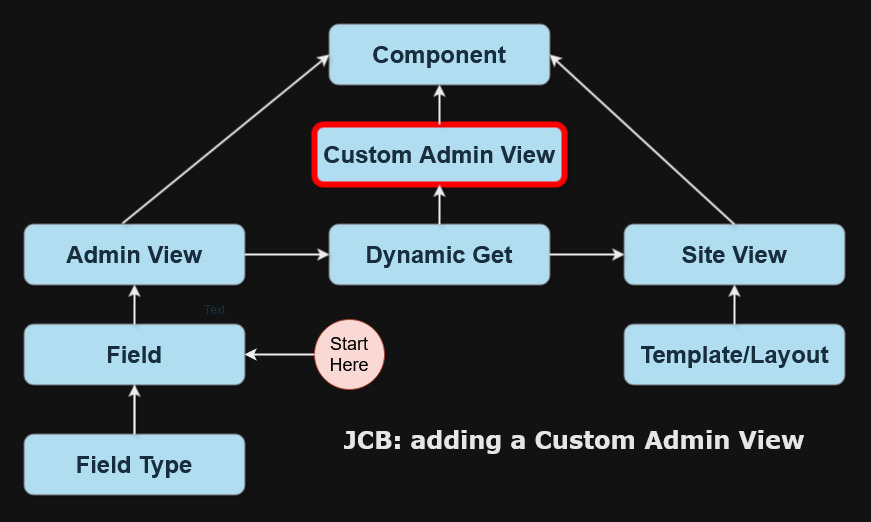
JCB1 Custom Admin View
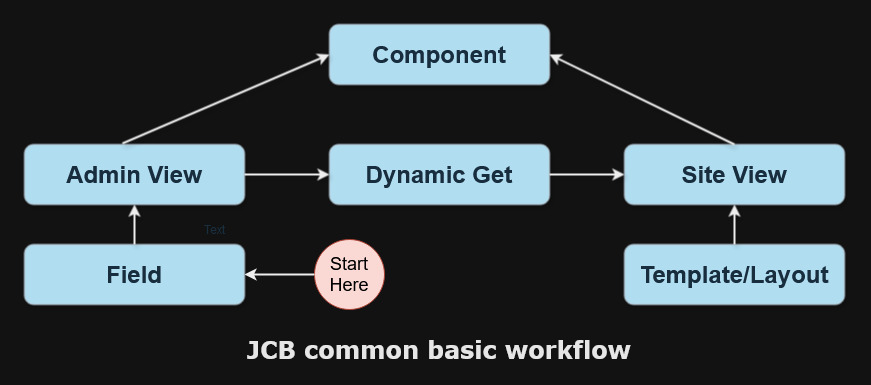
JCB2 Basis
January Components
January Connecting Third Party Libraries
January Floating Labels
January Happy 2025
January Web Development
March Blog Joomla
March Case Study
March Disaster
MySqlTab
SitViewCodeSuggestions
TutorialKing
Admin Tabs Custom Code
Article Menu Item
ClassDescriptionGitea
Diagram Selection Process
Joomla Extension Changlog View
Menu Templates
Selection Process Current
Starttime
EventSchedule3
Chrome OvkmdodwV6
Dashboard 01 Custom Css Example
Dashboard 02 Disable Core Extensions
Dashboard 03 Edit Layout
Dashboard 04 Images
Dashboard 05 User Dashboard
Dashboard 06 Custom Quick Icons
Dashboard 07 Admin Checklist
Fimage1
Fimage10
Fimage11
Fimage12
Fimage13
Fimage2
Fimage3
Fimage4
Fimage5
Fimage6
Fimage7
Fimage8
Fimage9
Image 20250114112645473
Image1
Image10
Image11
Image12
Image13
Image1a
Image2
Image3
Image4
Image4a
Image5 1
Image5
Image5a
Image6
Image6a
Image7
Image8
Image9
Junction Table