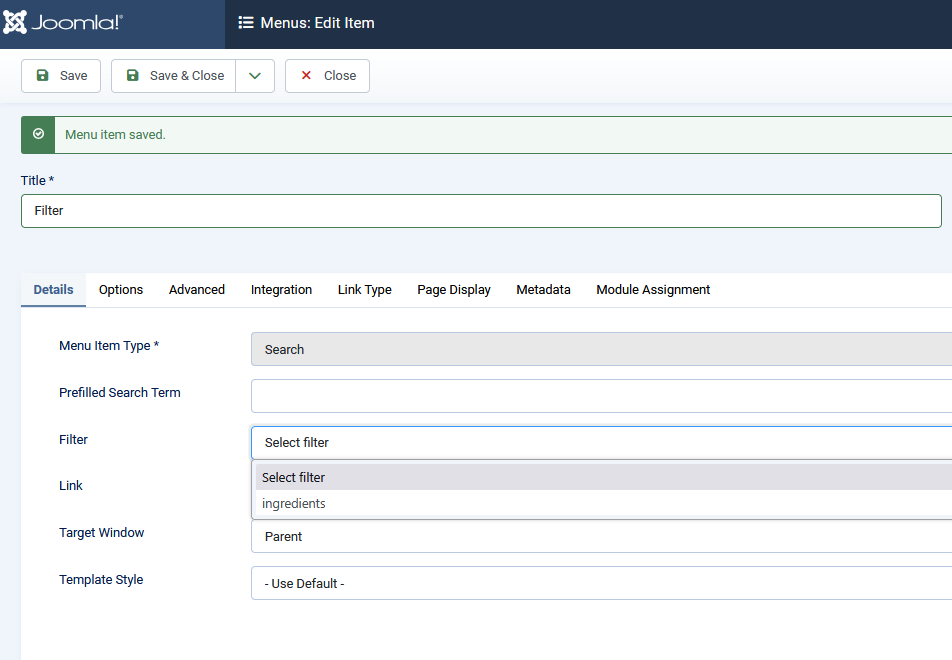
Caso studio: Sistema di automazione basato su Joomla

Probabilmente conosci strumenti di automazione come make.com, Zapier e IFTTT: strumenti no-code utilizzati per collegare sistemi diversi. Ma lo sapevi che puoi farlo con i task schedulati di Joomla? Mohamed Abdelaziz condivide con noi come ha costruito un sistema di automazione basato su Joomla.

Contesto

Il cliente è un centro di esamei linguistici, hanno un sistema un po 'complicato con i seguenti sottosistemi:

  1. Sito web Joomla, accessibile al pubblico in modo che gli studenti possano registrarsi alle sessioni d'esame e pagare le tasse di iscrizione.
  2. Istanza interna SuiteCRM per gestire clienti, contatti, fatture e seguire la frequenza dell'esame.
  3. Gateway di pagamento PayU per consentire i pagamenti con carta per le registrazioni.
  4. Fio sistema bancario per consentire pagamenti con bonifico bancario.
  5. Istanza FlexiBee per fini contabili.

La registrazione sta funzionando senza problemi sul sito web di Joomla, tuttavia ci sono alcuni problemi con le notifiche di pagamento da PayU e Fio che non vengono rispedite al sito web di Joomla per approvare il pagamento.

Ho sviluppato un plugin Joomla da integrare con SuiteCRM per sincronizzare le informazioni del registrante, ma c'è ancora un problema con il controllo dello stato del pagamento della fattura verso PayU e Fio che viene fatto manualmente, trasferendo di conseguenza i dati della fattura al FlexiBee.

A questo punto nasce la necessità di un sistema che funga da hub centrale per la gestione complessiva delle agende, integrando i quattro sistemi indipendenti attraverso le API.

Make.com è stato utilizzato per questo sistema, ma questo ha portato al seguente problema.

Note dolenti

  • L'utilizzo di una piattaforma di automazione generica come Make.com ha avuto alcune insidie, come non ci sono moduli speciali da integrare con 3 dei 4 sistemi coinvolti in questo progetto, quindi l'automazione è piuttosto complicata per un progetto senza codice.
  • La sincronizzazione di dati sensibili come i pagamenti PayU e le transazioni bancarie Fio implica che questi dati siano accessibili a terze parti come Make.com, il che è molto rischioso per il cliente.

Analisi dei problemi

Mi è stato chiesto di suggerire una soluzione per risolvere questi problemi, quindi ho condotto un'analisi degli scenari di Make.com e ho scoperto che:

Le API di SuiteCRM e PayU sono limitate nel filtrare record specifici, quindi non è semplice su Make.com sincronizzare uno stato specifico della fattura SuiteCRM con il suo stato di pagamento da PayU. È necessario utilizzare un modulo HTTP per recuperare un elenco di fatture SuiteCRM non pagate, quindi passarle in loop e verificare i pagamenti PayU.

L'API Fio restituisce solo un foglio di transazione all'interno di un intervallo di date specificato, quindi questo deve in qualche modo essere convertito in una struttura dati efficiente come un array o un elenco per essere in grado di trovare un pagamento con un numero di fattura.

Inutile dire quante operazioni Make.com sono necessarie per implementare questa logica, il che porta ad un aumento dei costi logaritmici poiché il numero delle operazioni richieste è in rapida crescita.

Sfide

  • La documentazione API del sistema bancario Fio è solo in lingua ceca, ma non conosco una sola parola ceca! Il cliente ha fornito una copia PDF e sono stato in grado di tradurla con l'aiuto di un account ChatGPT plus (ricordo che questo è iniziato nell'aprile 2024, quando ChatGPT non aveva molto potere come ora nel 2025).
  • Anche testare un tale sistema è stato molto impegnativo perché integra 4 sistemi diversi, ogni sistema ha la propria implementazione API diversa, ecc.

Progettazione di soluzioni

Credo che Joomla possa essere utilizzato per costruire questo tipo di soluzione, quindi ho iniziato a scoprire quale tipo di estensione può fare cosa. Il “Attività programmateLa funzione " è stata introdotta in Joomla 4.1 e può essere utilizzata per automatizzare le cose con Joomla, come spiegato in questo articolo: Automatizzazione con le attività pianificate di Joomla.

Penso di aver trovato la mia vocazione, così ho deciso di progettare la soluzione con il Attività programmate Al suo centro per automatizzare i flussi di lavoro di sincronizzazione, si prega di guardare il seguente diagramma.
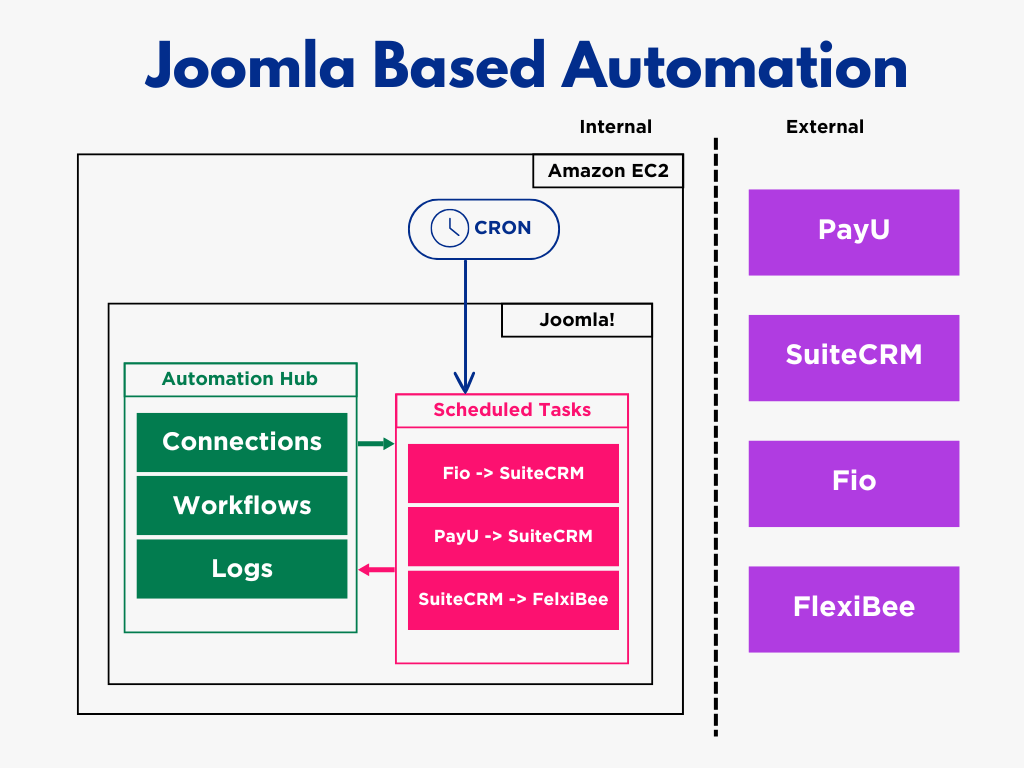
Diagramma che mostra l'automazione basata su Joomla

Come potete vedere,i task  Cron Iverranno utilizzati per attivare le attività pianificate in base al tempo in base ai requisiti aziendali.

Non ho scelto AWS EC2 per l'hosting; il cliente lo aveva già, quindi lo abbiamo usato per risparmiare sui costi di hosting aggiuntivi.

Attuazione

Connessioni

Ho progettato prima il database, poi ho iniziato a sviluppare le Connessioni parte del componente, in quanto fondamentale per le altre parti.
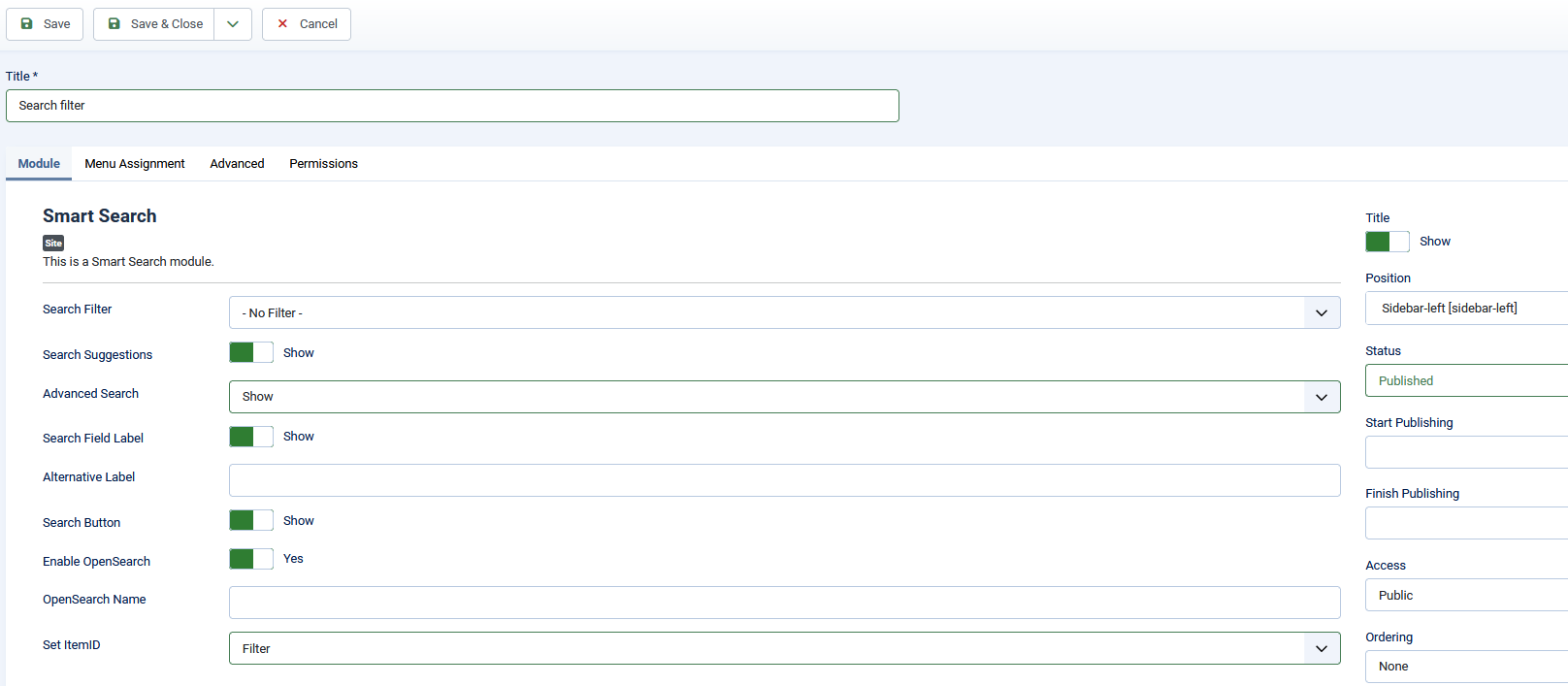

image6

Come forse saprai, ogni sistema esterno ha la propria logica di autenticazione API e le proprie credenziali. Per incapsulare i dettagli di ogni connessione API in un singolo campo, ho deciso di memorizzare le credenziali di connessione come JSON stringa, simile alla params campo in Joomla articoli. Ho anche aggiunto un Prova Pulsante per la Connessione modificare il modulo per confermare che i dettagli di connessione inseriti siano corretti e funzionanti.
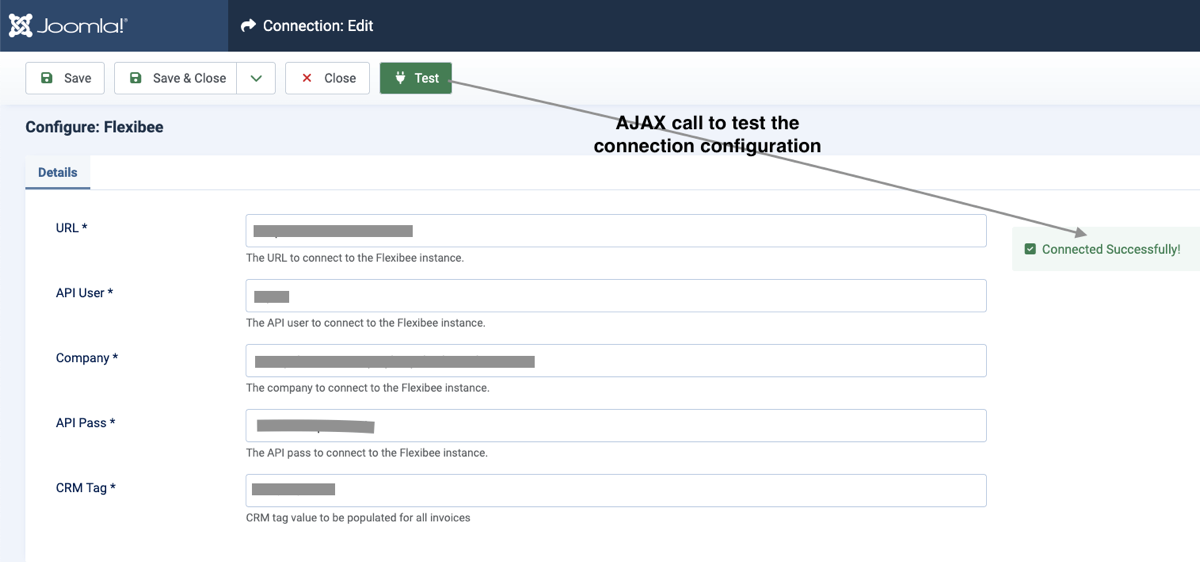

image5

Flussi di lavoro

Il flusso di lavoro è un processo di sincronizzazione tra 2 sistemi, ad esempio da PayU a SuiteCRM flusso di lavoro è un processo per verificare se una fattura nello stato "non pagata" in  SuiteCRMha una conferma di pagamento in PayU , in caso affermativo devo cambiare lo stato del pagamento della fattaura in "pagato" e chiudere il task.

Anche i flussi di lavoro vengono utilizzati nel filtraggio dei registri.
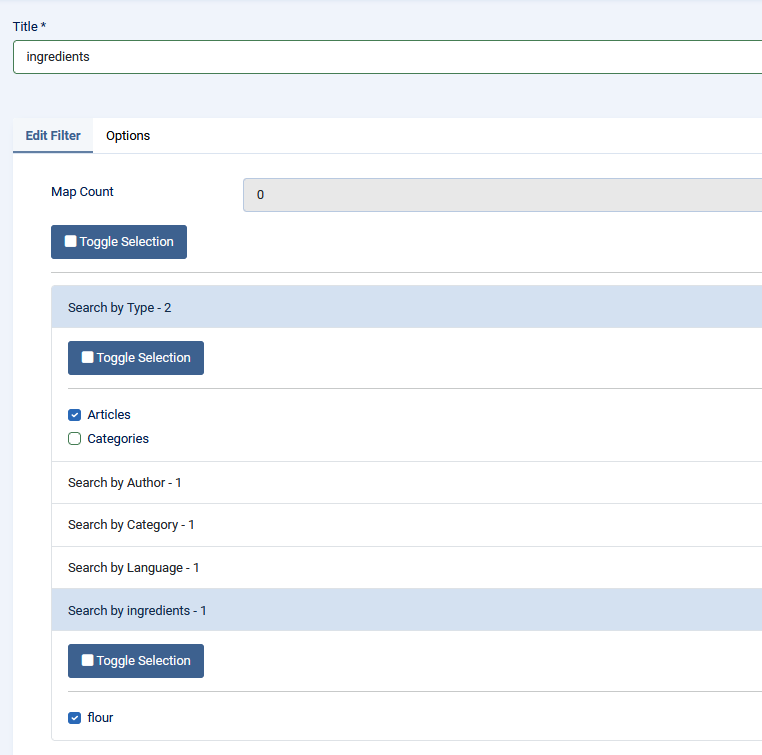

image3

Log

Si tratta di informazioni dettagliate sugli elementi sincronizzati da entrambi i sistemi in fase di sincronizzazione. È utile ai fini dell'auditing e della risoluzione dei problemi, in quanto è possibile trovare gli ID degli elementi pertinenti e l'ora in cui è stata eseguita la sincronizzazione.
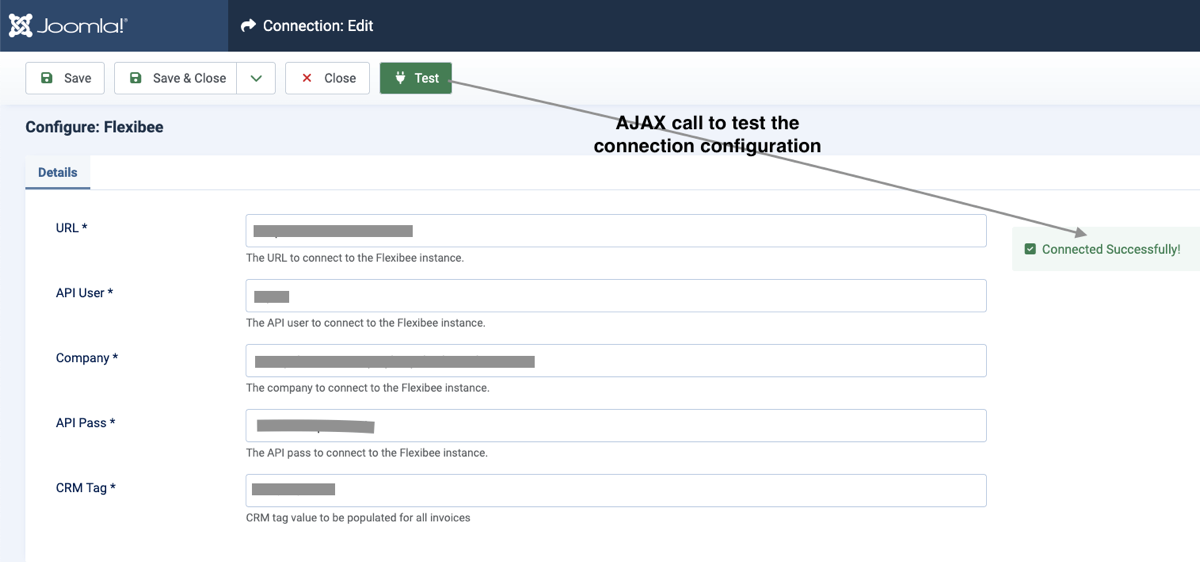
image5 1

image2

Attività programmate

Ho creato un plugin per le attività pianificate per ogni flusso di lavoro per consentire al cliente di pianificare l'esecuzione / l'attivazione dei flussi di lavoro in base alle sue esigenze aziendali.


image4

Ho usato  Web Cron Opzione piuttosto che l'opzione Pianificatore lazyperché il cliente vuole attivare le attività su tempi specifici.

Implementazione

La soluzione è stata implementata come standalone Joomla sito web insieme al Hub di automazione componente e i plugin delle attività pianificate.

Abbiamo creato un Cron lavoro per ogni plug-in di attività per attivare il flusso di lavoro corrispondente in base ai requisiti aziendali del cliente.

Anche se il cliente ha un sito pubblico Joomla per gestire le iscrizioni agli esami , e avremmo potuto implementare  la soluzione su quel sito, ho preferito implementarlo su un sito web privato autonomo per evitare il rischio di esporre al pubblico i dati della banca e del gateway di pagamento.

Alla fine è un componente di back office, quindi non è necessario che sia accessibile al pubblico.

Impatto sulla produttività e sull'efficienza

  • I risparmi di tempo nella gestione del check-in e della registrazione superano il 95%.
  • La gestione dell'agenda relativa alla fatturazione è stata ridotta di circa l'85%.
  • Il controllo delle transazioni con carta e delle date di scadenza delle fatture ha comportato un risparmio di tempo di circa il 95%.
  • Il tasso di errore è stato ridotto di circa l'85% (gli errori attuali sono di natura diversa rispetto a prima).
  • Il risparmio di risorse umane è pari al 33%.
  • Il costo operativo è stato ridotto a quasi 0 rispetto al costo annuale previsto di 2 000 USD su Make.com. Il sito web dell'hub di automazione è installato sul server client per il quale sta già pagando per ospitare altri siti web, ossia non paga alcun centesimo in più per ospitare la soluzione dell'hub di automazione.

Alcuni articoli pubblicati sul Joomla Community Magazine rappresentano l'opinione personale o l'esperienza dell'Autore sul tema specifico e potrebbero non essere allineati alla posizione ufficiale del Progetto Joomla

Everything You Always Wanted to Know About a Disaster Recovery Plan But Were Afraid to Ask

In today’s digital landscape, ensuring business continuity is more than just a good idea - it's a necessity.

Whether you're managing an enterprise server, a personal website, or an online business, a well-designed disaster recovery plan can mean the difference between swift recovery and prolonged downtime. This comprehensive guide attempts to cover everything from robust backup strategies to specific considerations for websites, ensuring you’re prepared for any eventuality.

Building a Rock-Solid Backup Strategy

At the heart of any disaster recovery plan lies an effective backup policy. A well-rounded backup strategy not only protects your data but also minimizes downtime and mitigates the costs associated with data loss.

Types of Backup

Each backup type plays a distinct role in protecting your digital assets:

  • Full Server Backup: Creates a complete snapshot of your entire server, capturing every file, setting, and configuration. While it offers comprehensive recovery, it does require significant storage space and more time to complete.
  • Site Backup: Focuses on individual websites or web applications. This is ideal for businesses that manage multiple online properties, offering a faster and more resource-efficient recovery process for web assets.
  • Data Backup: Concentrates on the critical data - databases, documents, multimedia files - that drives your operations. Often automated and incremental, this method ensures rapid restoration of vital information.
  • SaaS Provider Backup: As cloud-based services become integral to business, ensuring that data stored in platforms like CRM systems or email services is backed up adds an extra layer of security, especially if the SaaS provider faces issues.
  • Replicated Site: Maintains a real-time or near-real-time copy of your primary site, ensuring that your online presence remains uninterrupted even during failures. This method is key for businesses that demand continuous uptime.

Backup Location

Where you store your backups significantly impacts both recovery speed and data security:

  • On the Server: Storing backups directly on the same server allows for quick retrieval. However, if the server fails or is compromised, both live data and backups are at risk.
  • On Another Server: Off-site backups on a separate server or location offer enhanced protection against localized disasters such as hardware failures or natural events. Though recovery may take slightly longer, the added security is often worth the trade-off.

Why Take a Backup?

The rationale behind a solid backup strategy goes beyond mere data storage - it directly influences your bottom line:

  • Cost of Downtime: Unplanned downtime can lead to lost revenue, decreased customer trust, and a tarnished brand reputation. A strong backup plan helps resume operations swiftly, minimizing these impacts.
  • Cost of Lost Data: Data loss can be catastrophic, disrupting operations, compromising sensitive information, and potentially leading to legal complications. Regular backups ensure that your business can bounce back quickly from data loss incidents.

Restoration Considerations

A backup is only as good as your ability to restore it effectively:

  • Speed of Restoration: Fast restoration minimizes downtime. Leveraging automated processes and having clear recovery workflows are essential to meet Recovery Time Objectives (RTO).
  • Minimizing Lost Data: Regular and incremental backups help reduce the risk of significant data loss, ensuring that you can recover the most recent version of your data with minimal gaps.

Advanced Considerations for a Comprehensive Backup Policy

Beyond the basics, several advanced practices can further bolster your backup strategy:

Backup Frequency and Retention Policies

  • Scheduling: Determine optimal backup intervals (hourly, daily, or weekly) to minimize data loss while balancing storage and processing costs.
  • Retention: Establish clear policies on how long to store backups and the number of versions to keep, ensuring compliance and efficient resource management.

Security and Encryption

  • Data Protection: Encrypt backups during both transmission and storage to safeguard against unauthorized access.
  • Access Controls: Implement strict permissions to ensure only authorized personnel can access or restore backup data.

Compliance and Regulatory Requirements

  • Legal Considerations: Ensure your backup strategy meets any industry or jurisdiction-specific regulations regarding data protection, privacy, and retention.
  • Auditing: Regular audits and compliance checks help identify and resolve potential weaknesses in your backup processes.

Backup Testing and Verification

  • Restoration Drills: Regular testing through simulated recovery scenarios ensures that your backup plan is effective and identifies any bottlenecks.
  • Integrity Checks: Automated tools can help verify the consistency and accuracy of your backup data over time.

Cloud and Geographically Redundant Backups

  • Cloud Storage: Utilizing cloud-based backup solutions adds flexibility and off-site security.
  • Geographical Diversity: Storing backups in multiple regions protects against local disasters, ensuring continuous data availability.

Automation and Monitoring

  • Automation Tools: Automate backup processes to reduce human error and ensure consistent scheduling.
  • Monitoring Systems: Implement systems that alert you to backup failures or anomalies, allowing for prompt corrective action.

Integration with Disaster Recovery Plans

  • Holistic Approach: Integrate your backup policy with your overall disaster recovery plan. Define clear Recovery Point Objectives (RPO) and Recovery Time Objectives (RTO) to align your recovery efforts with business continuity goals.

Website-Specific Disaster Recovery Considerations

Websites present unique challenges that demand tailored disaster recovery strategies. Here’s what you need to consider to protect your online presence:

Web Hosting and Content Delivery

  • Reliable Hosting Providers: Choose a hosting provider with robust Service Level Agreements (SLAs) and proven uptime records.
  • Content Delivery Networks (CDNs): Use a CDN to speed up content delivery and provide an additional layer of redundancy, ensuring that cached versions of your site are available even if the origin server is down.

DNS and Domain Management

  • Backup DNS Providers: Use secondary DNS services to safeguard against DNS failures at your primary provider.
  • Low TTL Settings: Configure low Time-To-Live (TTL) settings for your DNS records to allow for quick propagation of changes during a failover.

Cybersecurity Measures

  • Web Application Firewall (WAF): Implement a robust WAF to protect against common web threats such as SQL injection and DDoS attacks.
  • Intrusion Detection and Monitoring: Continuous monitoring helps detect unusual activity quickly, allowing you to respond to breaches as part of your broader disaster recovery efforts.

Third-Party Dependencies

  • Assess External Integrations: Identify and document all third-party services your website relies on, from payment gateways to analytics platforms.
  • API Redundancy: Consider alternative API endpoints or backup providers to ensure seamless operation if a primary service fails.

Communication and Customer Experience

  • Status Pages and Alerts: Maintain a public status page and automated alert system to keep users informed during an outage.
  • Customer Support Readiness: Ensure your support team is equipped to handle inquiries and provide clear guidance during recovery efforts, helping to maintain customer trust.

Continuous Testing and Improvement

  • Regular Disaster Recovery Drills: Schedule and conduct disaster recovery drills to test the effectiveness of your recovery strategies.
  • Comprehensive Documentation: Keep detailed records of your disaster recovery plan, including technical procedures, contact lists, and step-by-step workflows.
  • Ongoing Updates: Regularly review and update your disaster recovery plan to address new threats, integrate emerging technologies, and improve overall resilience.

Conclusion

Designing an effective disaster recovery plan is a multi-faceted endeavour that goes beyond mere data backups. It involves a holistic approach that encompasses a robust backup policy, secure and redundant storage solutions, rapid restoration procedures, and specific strategies tailored to your website's unique challenges.

By understanding the various types of backups, selecting appropriate storage locations, and integrating advanced practices like automation, regular testing, and compliance auditing, you can significantly mitigate the risks associated with data loss and downtime. For websites, additional considerations - such as infrastructure redundancy, reliable hosting, DNS management, cybersecurity, and clear communication - ensure that your online presence remains resilient even in the face of unexpected challenges.

Ultimately, the goal is to create a disaster recovery plan that not only protects your digital assets but also supports swift, seamless recovery when disaster strikes. With these comprehensive strategies in place, you’ll be well-equipped to handle emergencies and keep your operations running smoothly - no matter what comes your way.

Embrace proactive planning, stay vigilant, and continually refine your approach. In the ever-evolving digital world, a well-prepared disaster recovery plan is your best defence against uncertainty.

Some articles published on the Joomla Community Magazine represent the personal opinion or experience of the Author on the specific topic and might not be aligned to the official position of the Joomla Project

Everything You Always Wanted to Know About a Disaster Recovery Plan But Were Afraid to Ask

In today’s digital landscape, ensuring business continuity is more than just a good idea - it's a necessity.

Whether you're managing an enterprise server, a personal website, or an online business, a well-designed disaster recovery plan can mean the difference between swift recovery and prolonged downtime. This comprehensive guide attempts to cover everything from robust backup strategies to specific considerations for websites, ensuring you’re prepared for any eventuality.

Building a Rock-Solid Backup Strategy

At the heart of any disaster recovery plan lies an effective backup policy. A well-rounded backup strategy not only protects your data but also minimizes downtime and mitigates the costs associated with data loss.

Types of Backup

Each backup type plays a distinct role in protecting your digital assets:

  • Full Server Backup: Creates a complete snapshot of your entire server, capturing every file, setting, and configuration. While it offers comprehensive recovery, it does require significant storage space and more time to complete.
  • Site Backup: Focuses on individual websites or web applications. This is ideal for businesses that manage multiple online properties, offering a faster and more resource-efficient recovery process for web assets.
  • Data Backup: Concentrates on the critical data - databases, documents, multimedia files - that drives your operations. Often automated and incremental, this method ensures rapid restoration of vital information.
  • SaaS Provider Backup: As cloud-based services become integral to business, ensuring that data stored in platforms like CRM systems or email services is backed up adds an extra layer of security, especially if the SaaS provider faces issues.
  • Replicated Site: Maintains a real-time or near-real-time copy of your primary site, ensuring that your online presence remains uninterrupted even during failures. This method is key for businesses that demand continuous uptime.

Backup Location

Where you store your backups significantly impacts both recovery speed and data security:

  • On the Server: Storing backups directly on the same server allows for quick retrieval. However, if the server fails or is compromised, both live data and backups are at risk.
  • On Another Server: Off-site backups on a separate server or location offer enhanced protection against localized disasters such as hardware failures or natural events. Though recovery may take slightly longer, the added security is often worth the trade-off.

Why Take a Backup?

The rationale behind a solid backup strategy goes beyond mere data storage - it directly influences your bottom line:

  • Cost of Downtime: Unplanned downtime can lead to lost revenue, decreased customer trust, and a tarnished brand reputation. A strong backup plan helps resume operations swiftly, minimizing these impacts.
  • Cost of Lost Data: Data loss can be catastrophic, disrupting operations, compromising sensitive information, and potentially leading to legal complications. Regular backups ensure that your business can bounce back quickly from data loss incidents.

Restoration Considerations

A backup is only as good as your ability to restore it effectively:

  • Speed of Restoration: Fast restoration minimizes downtime. Leveraging automated processes and having clear recovery workflows are essential to meet Recovery Time Objectives (RTO).
  • Minimizing Lost Data: Regular and incremental backups help reduce the risk of significant data loss, ensuring that you can recover the most recent version of your data with minimal gaps.

Advanced Considerations for a Comprehensive Backup Policy

Beyond the basics, several advanced practices can further bolster your backup strategy:

Backup Frequency and Retention Policies

  • Scheduling: Determine optimal backup intervals (hourly, daily, or weekly) to minimize data loss while balancing storage and processing costs.
  • Retention: Establish clear policies on how long to store backups and the number of versions to keep, ensuring compliance and efficient resource management.

Security and Encryption

  • Data Protection: Encrypt backups during both transmission and storage to safeguard against unauthorized access.
  • Access Controls: Implement strict permissions to ensure only authorized personnel can access or restore backup data.

Compliance and Regulatory Requirements

  • Legal Considerations: Ensure your backup strategy meets any industry or jurisdiction-specific regulations regarding data protection, privacy, and retention.
  • Auditing: Regular audits and compliance checks help identify and resolve potential weaknesses in your backup processes.

Backup Testing and Verification

  • Restoration Drills: Regular testing through simulated recovery scenarios ensures that your backup plan is effective and identifies any bottlenecks.
  • Integrity Checks: Automated tools can help verify the consistency and accuracy of your backup data over time.

Cloud and Geographically Redundant Backups

  • Cloud Storage: Utilizing cloud-based backup solutions adds flexibility and off-site security.
  • Geographical Diversity: Storing backups in multiple regions protects against local disasters, ensuring continuous data availability.

Automation and Monitoring

  • Automation Tools: Automate backup processes to reduce human error and ensure consistent scheduling.
  • Monitoring Systems: Implement systems that alert you to backup failures or anomalies, allowing for prompt corrective action.

Integration with Disaster Recovery Plans

  • Holistic Approach: Integrate your backup policy with your overall disaster recovery plan. Define clear Recovery Point Objectives (RPO) and Recovery Time Objectives (RTO) to align your recovery efforts with business continuity goals.

Website-Specific Disaster Recovery Considerations

Websites present unique challenges that demand tailored disaster recovery strategies. Here’s what you need to consider to protect your online presence:

Web Hosting and Content Delivery

  • Reliable Hosting Providers: Choose a hosting provider with robust Service Level Agreements (SLAs) and proven uptime records.
  • Content Delivery Networks (CDNs): Use a CDN to speed up content delivery and provide an additional layer of redundancy, ensuring that cached versions of your site are available even if the origin server is down.

DNS and Domain Management

  • Backup DNS Providers: Use secondary DNS services to safeguard against DNS failures at your primary provider.
  • Low TTL Settings: Configure low Time-To-Live (TTL) settings for your DNS records to allow for quick propagation of changes during a failover.

Cybersecurity Measures

  • Web Application Firewall (WAF): Implement a robust WAF to protect against common web threats such as SQL injection and DDoS attacks.
  • Intrusion Detection and Monitoring: Continuous monitoring helps detect unusual activity quickly, allowing you to respond to breaches as part of your broader disaster recovery efforts.

Third-Party Dependencies

  • Assess External Integrations: Identify and document all third-party services your website relies on, from payment gateways to analytics platforms.
  • API Redundancy: Consider alternative API endpoints or backup providers to ensure seamless operation if a primary service fails.

Communication and Customer Experience

  • Status Pages and Alerts: Maintain a public status page and automated alert system to keep users informed during an outage.
  • Customer Support Readiness: Ensure your support team is equipped to handle inquiries and provide clear guidance during recovery efforts, helping to maintain customer trust.

Continuous Testing and Improvement

  • Regular Disaster Recovery Drills: Schedule and conduct disaster recovery drills to test the effectiveness of your recovery strategies.
  • Comprehensive Documentation: Keep detailed records of your disaster recovery plan, including technical procedures, contact lists, and step-by-step workflows.
  • Ongoing Updates: Regularly review and update your disaster recovery plan to address new threats, integrate emerging technologies, and improve overall resilience.

Conclusion

Designing an effective disaster recovery plan is a multi-faceted endeavour that goes beyond mere data backups. It involves a holistic approach that encompasses a robust backup policy, secure and redundant storage solutions, rapid restoration procedures, and specific strategies tailored to your website's unique challenges.

By understanding the various types of backups, selecting appropriate storage locations, and integrating advanced practices like automation, regular testing, and compliance auditing, you can significantly mitigate the risks associated with data loss and downtime. For websites, additional considerations - such as infrastructure redundancy, reliable hosting, DNS management, cybersecurity, and clear communication - ensure that your online presence remains resilient even in the face of unexpected challenges.

Ultimately, the goal is to create a disaster recovery plan that not only protects your digital assets but also supports swift, seamless recovery when disaster strikes. With these comprehensive strategies in place, you’ll be well-equipped to handle emergencies and keep your operations running smoothly - no matter what comes your way.

Embrace proactive planning, stay vigilant, and continually refine your approach. In the ever-evolving digital world, a well-prepared disaster recovery plan is your best defence against uncertainty.

Some articles published on the Joomla Community Magazine represent the personal opinion or experience of the Author on the specific topic and might not be aligned to the official position of the Joomla Project